Autonomous Close
Close continuously. Lock faster.
Rebase continuously works your month-end close, reconciling accounts, investigating exceptions, and preparing adjustments so your team can move toward a zero-day close without giving up review or control.
- Audited to SOC 2 Type I and II
- Zero unapproved ERP postings
- Every adjustment backed by evidence
The manual close
The close is slow because every number has to be proved by hand.
Finance teams spend days matching balances, retracing work, chasing exceptions, and finding support across spreadsheets, inboxes, and systems.
The work is repetitive, the evidence is fragmented, and the problems often surface when the clock is already running.
Illustration: a bank reconciliation workbook for March 2026, with a 45.00 bank fee and a 12,400.00 deposit in transit left as unexplained differences, and a sticky note asking who booked the deposit. Every balance is proven by hand
Export the statement, match it line by line, and explain every difference in a workbook someone has to reconstruct later.
Illustration: the preparer's bank reconciliation workbook and, on top of it, the copy the reviewer rebuilt to check it, with the sign-off still pending. The reviewer rebuilds the tie-out
To sign off, the reviewer retraces every step, so review takes as long as preparation did.
Illustration: the last six working days of March 2026, with three exceptions, a bank fee not booked, an accrual that ran short and an invoice in the wrong account, all surfacing on the 31st. Exceptions surface on the last day
The fee never booked, the accrual ran short, the invoice hit the wrong account. By the time they surface, there is barely any time left to fix them.
Illustration: where the support for March's bank fee ended up: an email thread, a Slack message, a downloaded statement and a colleague's memory. The evidence is scattered everywhere
When someone asks why an entry was made months later, the support is buried across email, chat, files, and the memory of the person who prepared it.

The continuous close
A close that is prepared before your team opens it.
24/7
The close runs with the month, not after it
Every task runs as its inputs land, so reconciliation and review happen throughout the month instead of piling up at period end.
100%
Every line checked. No sampling.
Every statement line is matched, every manual entry is tested, and every control account is tied back to its source.
0.00
Unexplained difference
Every balance is tied to the cent. If something does not match, the difference is surfaced with its amount, date, source, and explanation.
0
Unapproved entries posted
Rebase can prepare the entry and its support, but posting stays behind your approval controls.
How it works
Every close task, worked end to end.
Rebase works the checklist throughout the month, preparing the reconciliations, investigations and entries. Your team reviews the work and makes every decision.
Checklist
Your close checklist, already in motion
Define the tasks, owners, reviewers, dependencies and deadlines once. Rebase carries the checklist forward each month and starts each task when its dependencies are ready.
- Rolls forward each month with the same controls
- Tasks wait for the inputs they depend on
- Every action and hand-off stays on the task record
March 2026 close14 tasks · working day 2Cash and bank
- Bank reconciliation: operating accountRebase AgentSigned offMWD 1
- Bank reconciliation: payroll accountRebase AgentIn reviewMWD 1
- Receivables control account tie-outRebase AgentIn progressJWD 1
- Payroll accrualRebase AgentNot startedAWD 2
- Manual journal testingDana RuizNot startedMWD 2
Illustration: the cash and bank group of the March 2026 close checklist in Rebase. The operating-account bank reconciliation is signed off, the payroll account is in review, the receivables tie-out is in progress and two tasks have not started. A chip shows Run all started four tasks. Reconcile
Reconciled to the cent, with every exception named
Rebase ties the ledger to bank statements, subledgers, invoices and other source systems. If something does not tie, it surfaces the exact difference with its amount, date, source and reference.
- Uses the exact accounting period
- Every figure traces back to its source
- Anything it cannot verify is stated explicitly
Tie-outs31 Mar 2026- 1010 · Operating cashBank statement2,184,920.000.00Tied
- 1020 · Payroll cashBank statement312,480.000.00Tied
- 1200 · Accounts receivableCustomer subledger1,642,300.000.00Tied
- 2000 · Accounts payableVendor subledger904,160.00−7,200.001 exception
Illustration: the March 2026 tie-outs in Rebase. Operating cash, payroll cash and receivables tie to the cent; payables carries one exception, an invoice of $7,200.00 booked to accrued expenses instead of the vendor subledger. Reconciling item · 1 of 1
INV-88213 · Northwind Logistics
7,200.00In the vendor subledger, but posted to 2100 Accrued expenses in the ledger. Reclass to 2000 proposed.
Illustration: the one exception Rebase Agent names on the payables tie-out, invoice INV-88213 from Northwind Logistics for $7,200.00, in the vendor subledger but posted to accrued expenses in the ledger. Adjust
The fix, proposed as an entry
Rebase prepares the balanced entry and the workpaper behind it. A named approver approves the exact lines before anything is posted to the ERP.
- Entries post only after approval
- Rejected entries return to Rebase for correction
RB-3F2A1C31 Mar 2026Reclass INV-88213 to the vendor subledger
- Dr 2100 · Accrued expenses7,200.00
- Cr 2000 · Accounts payable7,200.00
Approver: ControllerRejectApproveIllustration: journal entry RB-3F2A1C proposed by Rebase Agent, $7,200.00 from 2100 Accrued expenses to 2000 Accounts payable, dated 31 March 2026, waiting for the Controller, and a chip showing it posted to Business Central on 2 April. Review and close
A reviewer on every task. A month that closes clean.
Every task requires a named reviewer. Approve it, or send it back with a note for Rebase to resolve. The month cannot lock until every task is signed off and every entry is cleared.
- The reviewer is separate from the preparer
- Closed periods stay locked
MMegan CarterSigned offSubledger ties after the reclass. Nothing carried forward.
On the task's record · 2 Apr 2026, 11:20
Illustration: Megan Carter's sign-off of the March 2026 payables tie-out in Rebase, with her conclusion, recorded on the task. March 2026Closed- Tasks signed off14 of 14
- Entries pending0
Closed by the Controller · 2 Apr 2026
Illustration: March 2026 closed in Rebase, with all fourteen tasks signed off and no entry pending.
The month, in working days
Start prepared. Close on day two.
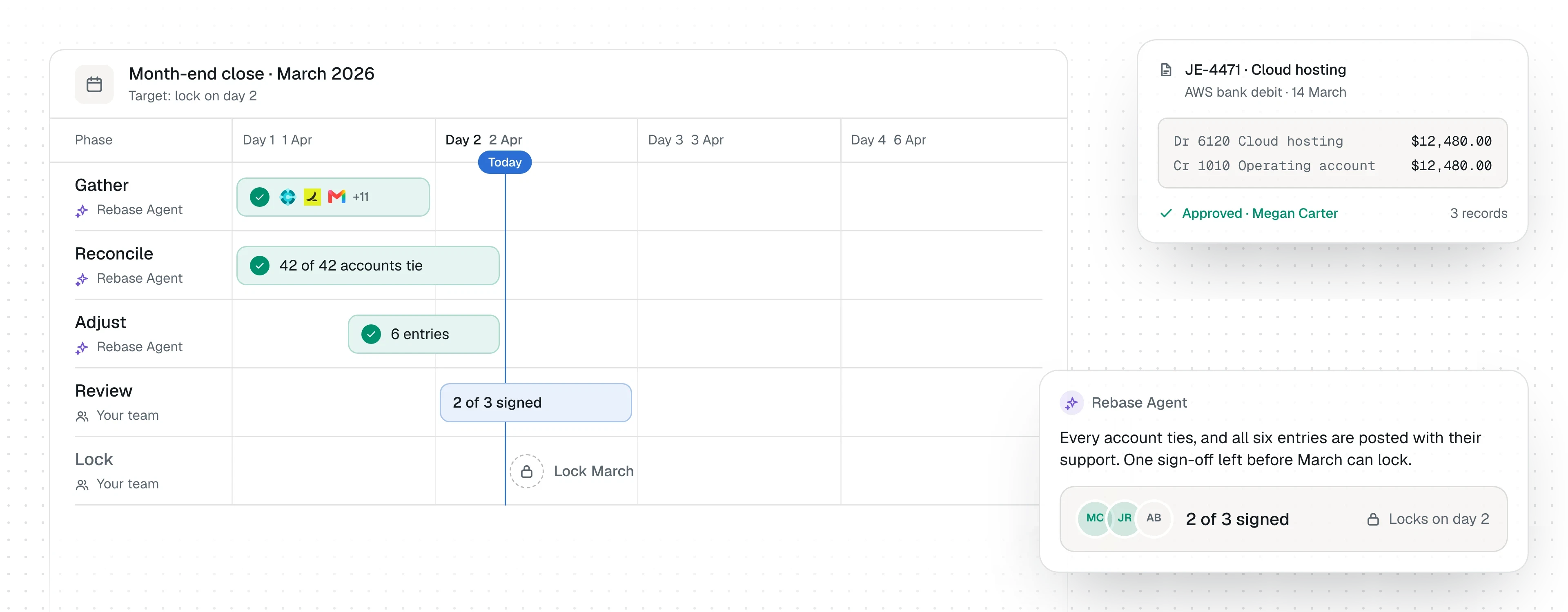
Rebase starts before the close window opens, prepares the work as inputs arrive, and keeps reviewers moving until every task is signed off and the period is locked.
- Before day 1
Roll the close forward
Tasks, owners, reviewers, dependencies and controls carry forward from the prior month. Rebase starts with a ready-to-run close, not a blank checklist.
- Working day 1
Rebase prepares the work
Reconciliations run, exceptions are investigated, workpapers are assembled, and proposed entries are prepared for review.
- Working days 1–2
Your reviewers decide
Approve the work or send it back with a note. Rebase resolves what comes back and resubmits it for review.
- Working day 2
Lock the month
Once every task is signed off and every entry is cleared, the period locks and stays locked.
Built around your close
Whatever your close includes, Rebase works through it.
Your month-end work can look different from company to company. Rebase handles reconciliations, accruals, journals, intercompany, and the rest of the tasks on your checklist.
Bring your checklist, policies, reviewers and source systems. Rebase adapts to the close your team already runs.
Cash and bank
Bank and cash reconciliations
Receivables
Customer subledger and control accounts
Payables
Vendor subledger and control accounts
Payroll
Payroll, benefits and related accruals
Accruals
Recalculated, validated and adjusted
Prepaids
Schedules and amortisation
Revenue
Period recognition and tie-outs
Fixed assets
Additions, depreciation and disposals
Inventory
Inventory, COGS and related reconciliations
Intercompany
Balances and eliminations across entities
Manual journals
Support, approval, segregation, cutoff and policy checks
Other close tasks
Whatever else is on your checklist
Works with your stack
Your systems stay. Rebase works across them.
Rebase connects to the systems your finance team already uses and works across them as part of the close.
Your ERP remains the system of record. Rebase only writes where you explicitly allow it, and controlled actions stay behind your approval rules.
 Trial balance
- Ledger entries
- Posts the approved entry
- Attaches the workpaper
 Trial balance
- Journal entries
- Aged payables
 Trial balance
- Bank statement lines
- Journal items
 Bank transactions
- Account balances
 Card transactions
- Bills
- GL accounts
 Card transactions
- Statements
- Cash transactions
 Posts the review update
- Reads the thread
Built for control
Autonomous work. Human authority.
Rebase prepares reconciliations, investigates exceptions, and proposes entries. Your team keeps control over approvals, permissions, and what reaches the ledger.
Nothing posts without approval
Controlled entries wait for the required reviewer before they reach the ledger.
Preparers do not approve their own work
Roles and review paths follow the segregation rules you define.
Every decision stays on the record
Sources, workpapers, approvals, comments, and actions stay attached to the task.
Closed periods stay closed
Once a period is locked, Rebase cannot change it.
Case studyNorthwind Manufacturing
Northwind closed March on working day two, with every tie-out on the record.
Northwind's finance team ran their first continuous close on Rebase: bank, receivables and payables tied as the month went, exceptions proposed as entries, and the Controller signing off from one checklist.
Read the case study“We stopped rebuilding the close every month. Rebase prepares it, we decide, and the audit trail is already there.”
Enterprise security
Built for finance data from day one.
Rebase is built for sensitive financial data, with controlled access, auditability, and enterprise-grade infrastructure.
Read the security page- SOC 2 Type I and Type II
- Encryption in transit and at rest
- Role-based access and permissions
- Deployment and data residency options
Questions
The questions we get asked first.
What does autonomous close mean?
Rebase continuously prepares the close as the month progresses. It gathers supporting data, reconciles accounts, investigates exceptions, and prepares adjustments so your team can focus on review and approval.
Does Rebase post journal entries automatically?
Not without the required approval. Rebase can prepare an entry with its supporting evidence, but controlled entries wait for the designated approver before they reach the ledger.
Does Rebase replace our ERP?
No. Your ERP remains the system of record. Rebase works across it and the other systems involved in your close, and only writes where you explicitly allow it.
Do we have to change how we close?
No. Your checklist, policies, reviewers, and approval paths stay yours. Rebase adapts to the way your team closes and works through that process continuously.
How long does it take to get started?
Your next close can run on Rebase. Connect the systems involved, bring your existing checklist, and define the reviewers and approval rules Rebase should follow.
What systems does Rebase work with?
Rebase works across the systems involved in the close, including ERPs, banks, expense platforms, payroll systems, email, and other financial data sources. Available integrations and supported actions vary by system.
How are review and approvals handled?
Your team defines who prepares, reviews, approves, and which actions Rebase is allowed to take. Preparers do not approve their own work, and approvals, comments, evidence, and actions remain attached to the task.
What happens when Rebase cannot complete a close task?
Rebase shows what is blocking the task, such as missing evidence, an unresolved exception, or an account that does not tie, and sends it to your team for review. It does not guess.
See it run on your own close.
Bring last month's checklist. We'll walk through what Rebase would have prepared, what it would have flagged, and what it would have left for your team.